Thermal receipt printers are powering smarter kiosks that connect inventory to e-commerce. See how ticketing workflows support AI-driven omnichannel retail.
Thermal Receipt Printers: The Quiet Omnichannel Win
Most retailers chasing AI in retail and e-commerce are focused on the flashy stuff: recommendations, chatbots, dynamic pricing. Meanwhile, a very unglamorous piece of hardware is often the thing that makes omnichannel feel smooth on the sales floor: the receipt printer.
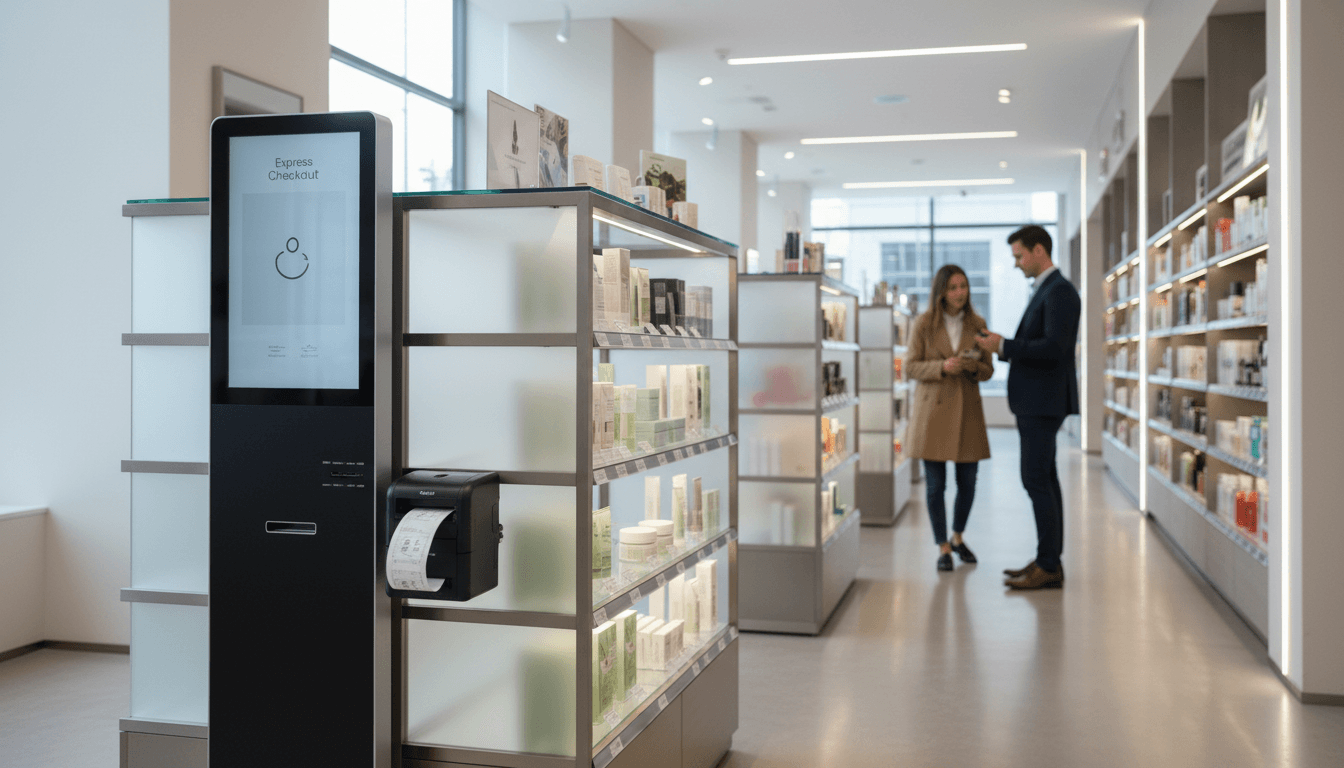
That’s why the recent move by OnQ—a retail design agency behind displays used across major U.S. retailers and in 14 countries—to integrate Epson POS thermal receipt printers into its Converge Take-a-Ticket display platform is more than a “vendor partnership” headline. It’s a signal that omnichannel reliability is being rebuilt from the edges inward: kiosks, tickets, shelf displays, and the operational glue connecting store inventory to e-commerce.
If you’re leading retail ops, store technology, or e-commerce (especially in Ireland where omnichannel expectations are rising fast), this matters for a simple reason: AI can’t fix a broken in-store workflow. It can only optimize what’s already instrumented, connected, and consistent.
Why “Take-a-Ticket” matters more than it sounds
Answer first: Ticket-based kiosks turn messy, manual “out-of-stock” moments into a controlled omnichannel flow that can be tracked, optimized, and improved.
For years, many retailers used pre-printed fulfillment cards: shoppers grabbed a card, brought it to the till, and staff completed the transaction. It worked—until it didn’t.
Here’s what typically goes wrong with pre-printed cards:
- Card inventory becomes its own supply chain (print runs, reprints, seasonal assortment swaps)
- Out-of-stock accuracy is poor (cards stay on display after the item is gone)
- Customers hit friction at the worst moment (they’re ready to buy, then discover the item isn’t available)
- Ops teams lose visibility (what was picked up, requested, abandoned, substituted?)
OnQ’s kiosk approach—tablet + Epson thermal printer—shifts the “ticket” from a static printed artifact to a dynamic output tied to real-time item data. When inventory changes, the kiosk reflects it immediately, and staff don’t need to run around removing tickets from shelves.
That one change creates the foundation for better omnichannel retail execution:
- Real-time inventory signals can drive endless aisle ordering
- Each kiosk interaction becomes behavioral data (what shoppers wanted, when, and where)
- Retailers can reduce the labour cost of maintaining “physical metadata” (cards, labels, manual updates)
The hidden role of POS hardware in AI-driven omnichannel
Answer first: AI needs clean inputs and dependable outputs. Receipt printers are part of the output layer that makes AI’s decisions actionable in-store.
When people talk about AI in retail, they usually mean prediction engines: demand forecasting, next-best-offer, replenishment optimisation. But those systems only create value if frontline workflows can execute the recommendation.
Think about the in-store moment this kiosk is designed for:
- A shopper wants an item that’s displayed but not physically available (or not on that shelf).
- The shopper needs a clear next step—without hunting for staff.
- The store needs a way to capture the intent and convert it into a sale (in-store or online).
That’s an AI-friendly loop if—and only if—the store has reliable “last-mile” tools. The printer is part of that reliability. It produces a ticket that can:
- Confirm the exact SKU/variant
- Trigger a workflow at the till
- Provide a reference for fulfilment or home delivery
- Support returns and customer service consistency
In other words: the ticket is a physical handshake between digital commerce and the store.
Why thermal printers are still a smart choice
Thermal printing is popular for a reason: it’s fast, quiet, low-maintenance, and designed for high-throughput retail environments.
From an omnichannel perspective, thermal printers also help standardise execution across locations. If you’re running 50 stores, you don’t want 50 different “workarounds” for endless aisle orders.
Epson’s m-Series printers are positioned for tight retail spaces where reliability and footprint matter. That’s not marketing fluff—space constraints are real. If your kiosk footprint grows by even a few inches, you might lose placement opportunities on the sales floor.
Where this gets interesting: kiosks as data engines (not just order stations)
Answer first: A kiosk isn’t just for transactions—it’s a sensor for shopper intent, and intent is the fuel for better AI.
OnQ’s statement that Take-a-Ticket integrates with inventory management systems and connects to retailers’ e-commerce platforms is the real headline. Once the kiosk is integrated, you can start answering questions that matter:
- Which SKUs are requested most often when they’re out of stock?
- At what times do shoppers attempt to buy unavailable items?
- Which departments generate the most “endless aisle” conversions?
- How many shoppers abandon after seeing “out of stock” vs. completing an online order?
Those insights feed directly into AI-driven omnichannel strategies:
- Inventory optimisation: If Store A constantly prints tickets for a certain size/colour, your allocation model should learn that.
- Assortment planning: If shoppers repeatedly request variants you don’t carry in-store, you can test micro-assortment expansions.
- Personalisation: If kiosk sessions can be linked (privacy-safely) to loyalty IDs or session tokens, you can personalise follow-ups.
I’m opinionated about this: “endless aisle” without measurement is just a fancy apology. The value comes when you can quantify intent and improve decisions week over week.
A practical example (what good looks like)
A retailer rolls out Take-a-Ticket kiosks for bulky items (say, homeware or seasonal electronics) where shelf space is limited. Over 8 weeks they see:
- Ticket prints spike on Saturdays between 12–4.
- The top printed SKUs are frequently out of stock in two urban locations.
- When items are out of stock, only 35% of shoppers complete the online order.
That data gives you three specific actions:
- Rebalance inventory toward high-intent stores.
- Add staff coverage during peak conversion windows (not all day).
- Improve the kiosk UX for out-of-stock ordering (simpler checkout, delivery estimates, alternative recommendations).
None of those improvements require “more AI” first. They require connected systems and measurable workflows. Then AI can amplify them.
How to evaluate kiosk + printer platforms for omnichannel retail
Answer first: Choose platforms that reduce manual work, integrate cleanly, and produce usable data—not just printed slips.
If you’re considering a kiosk solution (or modernising an older one), use this checklist. It’s not glamorous, but it prevents expensive disappointment.
1) Integration depth (inventory + e-commerce)
Ask exactly what “integrates with inventory” means:
- Is inventory updated in near real time or batch?
- Does it support store-level availability, safety stock, and on-hold units?
- Can it handle variant logic (size, colour, bundle SKUs)?
For e-commerce connectivity:
- Can the kiosk create an online cart or order directly?
- Can it attach store attribution for reporting and commission models?
- Can it surface delivery options and realistic ETAs?
2) Failure modes (because stores are messy)
Stores have Wi‑Fi dead zones, staff turnover, power interruptions, and occasional “creative” behaviour from customers.
You want clear answers on:
- What happens if the printer jams or runs out of paper?
- Can the kiosk cache transactions if the network drops?
- How are devices monitored (uptime, alerts, remote troubleshooting)?
3) UX and accessibility
A kiosk that looks good but confuses people will quietly fail.
Check for:
- Clear “buy online if out of stock” prompts
- Simple flows (ideally under 60 seconds)
- Accessibility options (contrast, font size, physical placement height)
4) Data you actually get back
If you can’t measure, you can’t improve.
Minimum viable reporting should include:
- Ticket prints by SKU/store/daypart
- Out-of-stock events vs. in-stock interactions
- Conversion to online purchase
- Assisted vs. unassisted completion (if staff help is a factor)
Why this matters right now (late 2025 retail reality)
Answer first: Retailers are under pressure to hold margins while meeting higher service expectations—so “operationally efficient omnichannel” beats “cool omnichannel.”
Late 2025 has been defined by cost scrutiny and operational discipline. Many retailers are balancing:
- Higher fulfilment and labour costs
- More demanding customer expectations (fast, flexible fulfilment)
- Fragmented tech stacks from years of incremental tools
That’s the context where hardware-software combinations like OnQ + Epson make sense. They’re not trying to impress anyone with a futuristic store concept. They’re fixing a real operational choke point: how to sell what isn’t physically in front of the shopper.
For retailers in Ireland building out AI-driven omnichannel experiences, this is a useful reminder: your “AI layer” only performs if your store layer is consistent. A kiosk that cleanly bridges store inventory to e-commerce is one of the most practical ways to get there.
Next steps: turn “tickets” into omnichannel growth
If you’re already running kiosks, audit them with a blunt question: Do they reduce friction and produce data that improves decisions? If the answer is “not really,” you’re paying for a gadget.
If you’re planning a rollout in 2026, start with one department where out-of-stocks are common and the endless aisle promise is easy to explain (high-consideration items, bulky products, or extended sizes). Then instrument it properly: track prints, track conversions, track the operational impact on staff time.
The bigger question I’d leave you with—especially for teams investing in AI in retail and e-commerce—is this: What’s the point of smarter forecasting or recommendations if the store can’t confidently convert intent into an order when the shelf is empty?